
DeepFaceLab
Advanced AI Face Swap Studio

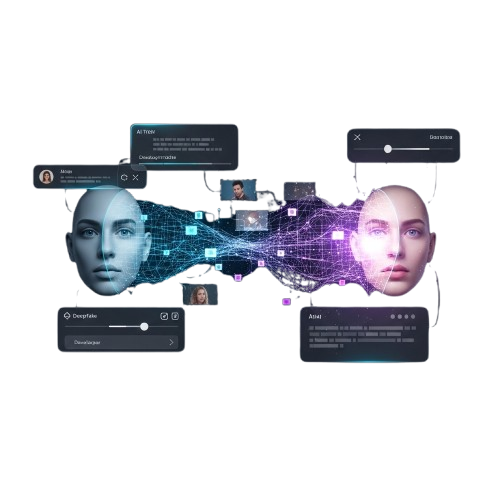
DeepFaceLab is a powerful, open-source deep learning software designed for creating realistic face swap videos using neural networks. By training custom AI models, DeepFaceLab enables users to generate high-quality deepfake content with precision, control, and professional results.

About DeepFaceLab

DeepFaceLab is an advanced, open-source deep learning software designed for creating realistic face swap videos using neural networks. It allows users to extract faces, train AI models, and merge results directly through a structured workflow without relying on automatic one-click tools.

By training custom models, DeepFaceLab enables users to generate highly detailed deepfake videos with precision and control. It provides powerful options for face alignment, model tuning, and video merging, making it possible to achieve professional-quality results.

Designed for flexibility and full creative control, DeepFaceLab is ideal for AI researchers, digital artists, and advanced users who want hands-on deepfake production.

DeepFaceLab Features

DeepFaceLab is a powerful AI face swap software that enables realistic deepfake video creation using neural network training and advanced video processing tools.

AI Face Swap System

DeepFaceLab uses advanced neural networks to create realistic face swap videos with precision, giving DeepFaceLab users full control over deepfake quality.

Neural Model Training

DeepFaceLab provides structured neural model training tools that allow DeepFaceLab creators to optimize datasets.

High Resolution Output

DeepFaceLab supports high resolution video output, enabling DeepFaceLab projects to maintain clarity, smooth blending, and professional visual results.

Advanced Face Extraction

DeepFaceLab includes precise face extraction tools that help DeepFaceLab users detect, align, and prepare facial data efficiently for training models.

Custom Model Tuning Pro

DeepFaceLab allows detailed parameter tuning so DeepFaceLab users can refine neural performance and improve deepfake realism with advanced.

GPU Acceleration Power

DeepFaceLab supports GPU acceleration, helping DeepFaceLab software process training tasks faster and deliver efficient deepfake rendering performance.

Video Merge Engine Pro

DeepFaceLab integrates a smart merging engine that allows DeepFaceLab creators to combine trained faces into videos with seamless blending accuracy.

Open Source Framework

DeepFaceLab operates as an open source framework, giving DeepFaceLab developers flexibility to customize workflows and enhance deepfake features.

Professional Workflow

DeepFaceLab follows a structured workflow system where DeepFaceLab users extract, train, merge, and refine models for consistent deepfake production.

Why Choose DeepFaceLab

DeepFaceLab is a powerful AI deepfake software built for creators who want full control, high realism, and professional face swap results using advanced neural training tools.

High AI Accuracy

DeepFaceLab delivers precise neural face mapping, allowing DeepFaceLab users to create realistic deepfake videos with refined detail and smooth blending.

Full User Control

DeepFaceLab gives complete manual workflow control, enabling DeepFaceLab creators to adjust training settings and refine deepfake performance precisely.

Advanced Training

DeepFaceLab includes structured neural training systems that help DeepFaceLab users optimize datasets for accurate and high quality deepfake output.

Open Source Power

DeepFaceLab operates as open source software, allowing DeepFaceLab developers to customize features, improve workflows, and expand AI capabilities.

GPU Performance

DeepFaceLab supports GPU acceleration so DeepFaceLab users can process neural training tasks faster and achieve efficient deepfake rendering speeds.

Pro Workflow System

DeepFaceLab follows a step by step workflow where DeepFaceLab users extract, train, merge, and refine models for consistent deepfake results.

How DeepFaceLab Works

DeepFaceLab follows a structured deepfake workflow where users extract faces, train neural networks, merge results, and refine videos for realistic AI face swap production.

Extract Face Data

DeepFaceLab scans source and target videos to detect and extract facial data, allowing DeepFaceLab users to prepare aligned images for neural training.

Train AI Models

DeepFaceLab uses powerful neural networks to train custom face swap models, enabling DeepFaceLab creators to improve realism over time.

Merge Face Output

DeepFaceLab merges trained facial models into target videos, allowing DeepFaceLab users to generate seamless deepfake scenes.

Refine Final Video

DeepFaceLab provides tuning and adjustment tools so DeepFaceLab users can refine blending, lighting, and detail for professional deepfake results.

Download DeepFaceLab

Download DeepFaceLab safely from its official repository or trusted developer sources. Always use verified builds to ensure stability, compatibility, and optimal performance. DeepFaceLab provides advanced AI face swap tools, neural training systems, and professional deepfake workflow support for high-quality video creation on supported Windows systems.

Installation Guide

DeepFaceLab can be installed by following a structured setup process. Ensure you download DeepFaceLab from official sources to maintain compatibility, GPU support, and stable neural training performance for professional deepfake creation on Windows systems.

Download Official

Download DeepFaceLab from its official repository to ensure DeepFaceLab files are secure, updated, and fully compatible with your Windows system.

Extract Package

Extract DeepFaceLab package files correctly so DeepFaceLab tools, models, and training scripts function smoothly without missing components.

Install Requirements

Install required GPU drivers and dependencies so DeepFaceLab can utilize hardware acceleration and deliver efficient neural training results smoothly and faster.
Configure Settings

Configure DeepFaceLab settings carefully to match your GPU performance and project needs, ensuring DeepFaceLab runs stable and efficiently.

Setup Dependencies

Configure required libraries and system variables carefully so DeepFaceLab runs efficiently and maintains optimized AI model processing stability.

Start Training AI

Launch DeepFaceLab training scripts to begin neural model processing and allow DeepFaceLab to generate realistic face swap outputs with enhanced AI precision.


Guide For DeepFaceLab

DeepFaceLab can be downloaded from its official repository or trusted developer sources. Always download from reliable sources to ensure DeepFaceLab security and full compatibility.

What People Think About?

Hear from our satisfied users who create realistic face swap videos with DeepFaceLab. From beginners to AI enthusiasts, users appreciate its precision, flexibility, and professional results. Discover why DeepFaceLab is trusted worldwide for high-quality deepfake creation.

Frequently Asked Questions

DeepFaceLab can be downloaded from official sources or trusted repositories. Always use verified builds to ensure DeepFaceLab security, compatibility, and optimal performance.

Installation

DeepFaceLab installation requires downloading from the official repository, extracting files, and setting up dependencies for neural training.

DeepFaceLab works best on Windows systems with GPU acceleration, though CPU processing is also possible for small projects.

GPU is recommended for DeepFaceLab to accelerate neural training and ensure high-quality deepfake results efficiently.

Always download DeepFaceLab from the official GitHub repository or trusted developer sources to ensure security and compatibility.

Adjust DeepFaceLab settings to match your GPU and project requirements to maintain smooth performance and accurate neural training.

DeepFaceLab can be used by beginners, but learning the workflow is essential for producing accurate and realistic face swap results.

AI Models

DeepFaceLab uses neural networks to analyze extracted faces and train models for realistic face swap video output.

Yes, DeepFaceLab allows multiple neural models to be trained separately for different video sources or styles.

Training time in DeepFaceLab depends on video resolution, dataset size, and GPU performance for accurate deepfake results.

Yes, DeepFaceLab requires face-aligned datasets for neural training to ensure accurate and high-quality deepfake outputs.

Optimize datasets, adjust model parameters, and use GPU acceleration to achieve better DeepFaceLab face swap realism.

DeepFaceLab allows pausing and resuming training, enabling users to continue model processing without losing progress.

Features

DeepFaceLab includes face extraction, neural network training, model merging, high-resolution video output, and GPU acceleration tools.

Yes, DeepFaceLab allows batch face extraction from multiple video sources for efficient neural model training.

DeepFaceLab supports high-resolution outputs, ensuring deepfake videos retain clarity, detail, and professional quality.

DeepFaceLab lets users adjust model parameters for more precise face swaps and realistic deepfake results.

Yes, DeepFaceLab is open source, enabling developers and users to customize tools and workflows freely.

DeepFaceLab supports popular video formats, making it versatile for various deepfake projects and editing workflows.

Troubleshooting

Merging in DeepFaceLab may fail due to mismatched face alignment, missing model weights, or incompatible video formats.

Slow training occurs if GPU is not utilized, dataset is large, or DeepFaceLab settings are not optimized for hardware acceleration.

Install required Python libraries and GPU drivers to ensure DeepFaceLab runs without errors or interruptions.

Low quality may result from insufficient training iterations, poor dataset quality, or improper model selection in DeepFaceLab.

DeepFaceLab primarily supports Windows; Mac/Linux usage is possible via emulators or virtual machines but not officially optimized.

Refine face alignment, increase training duration, and adjust model parameters to maximize DeepFaceLab deepfake realism.

DeepFaceLab – DeepFaceLab AI Face Swap Pro Studio
DeepFaceLab AI Face Swap Studio lets you create realistic face swaps, edit videos, and train models with advanced tools for professional results.

Price: Free

Price Currency: $

Operating System: Windows, macOs

Application Category: Software

Editor's Rating:
4.6
Scroll to Top